

Validation
The pack is checked against a list of rules while you work, not only when you build. Every problem the checks find is a finding. Findings show up on the item they are about, in the Problems panel, and in the build window, so a problem is visible where the item is rather than buried in a log after a failed build.
Checks, findings, one-click fixes, Auto fix and ignoring are all free.
Where findings show
- The item list: each item with a problem carries an icon. Hover it for a card listing the problems. Slot headers count the items with problems, and the line above the list (for example "3 blocked · 5 need attention") filters the list to just those items with Only these.
- The Findings tab in the item editor (new in 2.0.8): every finding for the selected item.
- Problems in the bottom panel: every finding in the pack, grouped by item or as a table. Open it with
Ctrl+Shift+M, or Show problems (Error List) in the command palette (Ctrl+K). - The build window: what stands in the way of the build.
The Findings tab
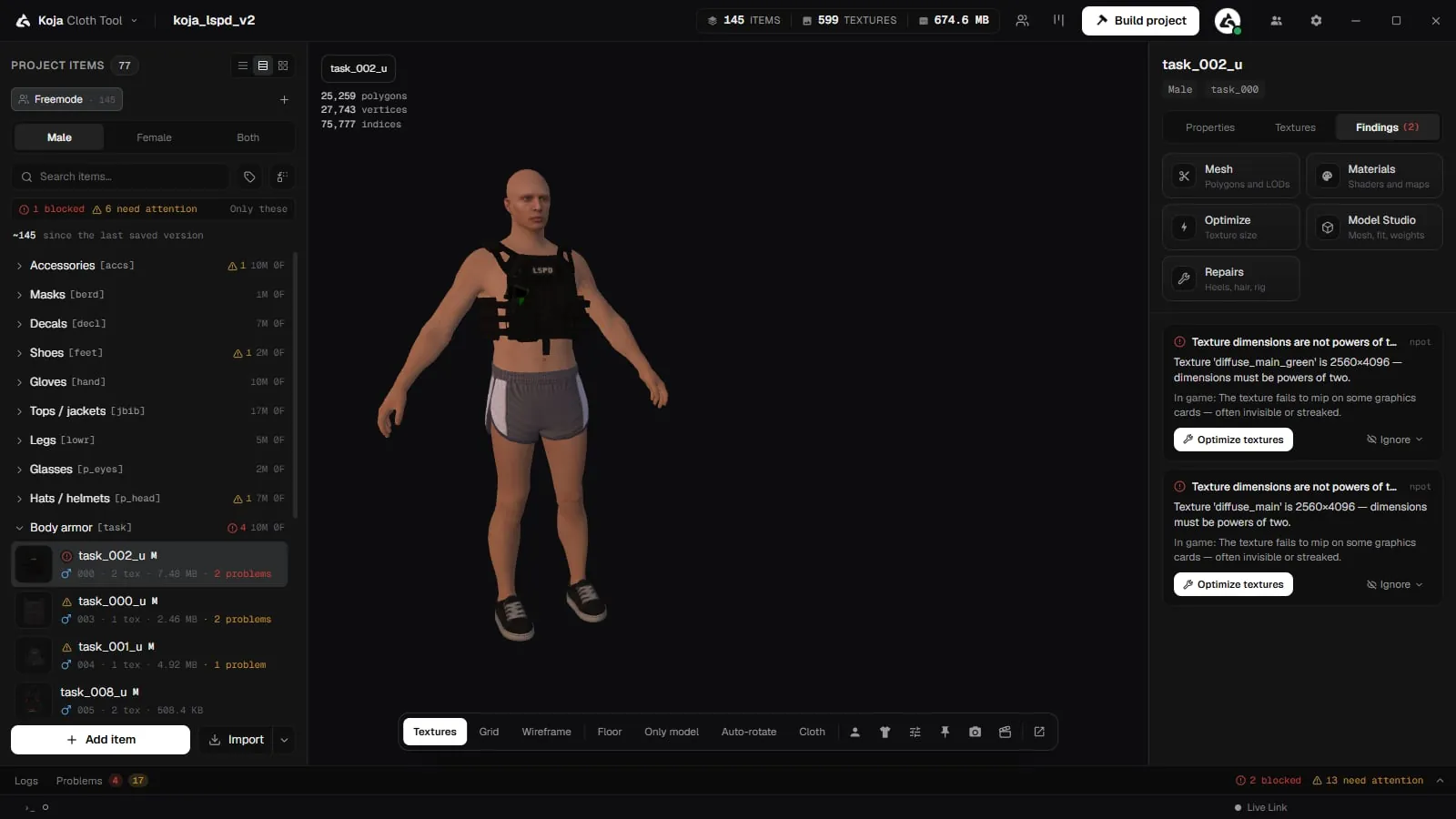
New in 2.0.8. Select an item and open Findings in the item editor. Each finding says:
- what is wrong, naming the file or texture it is about;
- In game: what this will look like or do in game if it ships as it is;
- a Fix button, when the app can fix it for you;
- Instead: …, another way out, when there is one.
A finding leads with the tool that fixes it. Fixes include, for example:
| Fix | What it does |
|---|---|
| Rename… | Renames the item to a suggested name. |
| Put the letters in order | Re-letters texture variants so the letters you see are the letters that ship. |
| Remove the extra variants | Drops variants past the format's limit. |
| Shrink to N² | Shrinks a texture the model barely uses to the suggested size in one step, and the warning clears. |
| Choose a model…, Choose a texture…, Choose a .yld…, Choose a hair alternate… | Points the item at the missing file. |
| Choose a sound… | Opens the audio preset picker. |
| Optimize textures, Optimize mesh | Opens the optimiser for the item. |
| Find duplicates… | Opens Find Duplicates. |
| Rig for high heels…, Generate it in Repairs…, Fit to ped… | Opens the matching Premium tool. |
Fixing many findings at once
New in 2.0.8. Auto fix… in the Problems panel lists every finding the tool can fix by itself, lets you tick which ones to fix, and runs them in one go: with a restore point when the project has version history, one Ctrl+Z to take the whole run back, and a re-check afterwards. Findings that need a decision from you are listed with what they need. See Logs and Problems.
Ignoring a finding
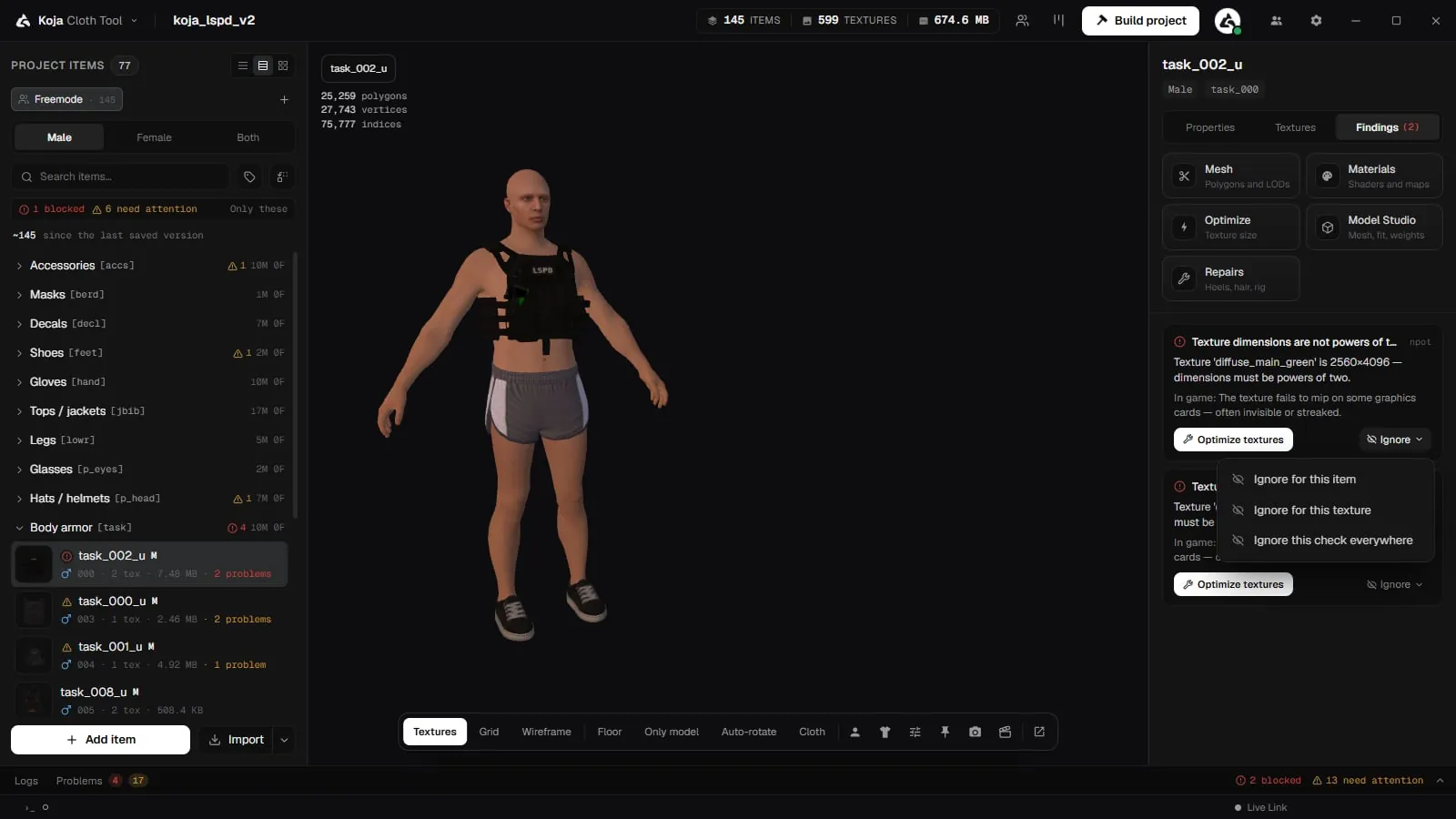
New in 2.0.8. Sometimes a finding is fine for your pack. Instead of switching the whole check off, ignore that one finding:
| Option | Scope |
|---|---|
| Ignore for this item | Just this garment. |
| Ignore for this texture | Just this texture variant. |
| Ignore this check everywhere | The whole project. |
You can add a note under Why (optional). The decision is saved in the project, so the whole team sees it, with who ignored it and the note.
- Ignoring a warning happens at once.
- Ignoring an error asks you to confirm (Build it broken?), and tells you what will happen in game.
- A few findings can't be ignored, because the pack would not contain what the list says.
Ignored findings move to an Ignored list on the Findings tab and are hidden in Problems until you tick Show ignored. Un-ignore brings one back.
Building with errors
The build refuses to start while an error stands. Fix it, or ignore it on purpose.
When you have ignored errors, the build button says so, for example Build anyway (2 ignored errors). This replaces the old "Build anyway" checkbox, which was removed in 2.0.8.
Severity
Every rule sits at one of four levels:
| Level | Effect |
|---|---|
| off | Not checked at all. |
| info | Noted, nothing more. |
| warning | Flagged, the build still runs. |
| error | Blocks the build. |
Change a rule's level under Project settings > Pre-build checks > Individual checks. Raise a rule to error to make it stop a build; drop it to off if it does not apply to how you work. The page says how many checks differ from their defaults, and how many findings are ignored in the project, with Review in Problems to see them. Reset to defaults puts everything back.
The checks are saved in the project, so everyone on a team builds against the same limits.
Thresholds
These are numbers rather than on/off, under Pre-build checks.
| Setting | What it governs |
|---|---|
| Size warning | Total pack size that earns a warning. 0 turns it off. |
| Size limit | Total pack size that blocks the build. 0 turns it off. |
| Textures per item | The game addresses variants by letter, a–z, so 26 is the format's own ceiling. |
| Largest texture | Anything bigger is reported as oversized. |
| Smallest texture | Below this a garment texture is almost always a placeholder. 0 turns it off. |
| Largest model | Per file, not per pack: one heavy .ydd stalls streaming even inside a pack that is under budget. 0 turns it off. |
| Wasted texture space: from | Textures at least this big are checked for how much of them the mesh actually uses. 0 turns it off. |
| Wasted texture space: below | A texture the mesh covers less of than this is reported, with a smaller size to shrink it to. 0 turns it off. |
| Longest name | Past this the game's own naming starts to truncate. |
| Require power-of-two textures | The game needs them. Turn off only if you know your loader tolerates otherwise. |
The rules
Files that are not there, or are not what they claim
| Rule | What it catches |
|---|---|
Item has no .ydd model | |
| The model file is gone from disk | The .ydd an item points at no longer exists. |
| A texture file is gone from disk | Same, for a texture source. |
| A texture variant with no file behind it | A placeholder that was never filled in. |
| A file is not really a game asset | Empty (0 bytes), a Git LFS pointer rather than the real file, or missing the RSC7 header that marks a compiled game file. |
| A file is the wrong type for its field | The build would copy it as it is and the game would not read it. |
| The project has nothing to build | A build would produce an empty pack. |
Names and slots
| Rule | What it catches |
|---|---|
| Item name is empty | |
| Item name is longer than the limit | |
| Name will be changed to be file-safe | The tool tells you what it will become. |
| The name says one component, the slot says another | It builds as the slot, not as the name. |
| Item gender is neither Male nor Female | |
| The model is rigged for the other ped | The name or model says one gender, the item is set to the other. |
| A paired item's toggles disagree | One gender has a flag enabled that its counterpart does not. |
Duplicates
| Rule | What it catches |
|---|---|
| Two items claim one drawable number | Names the items that collide. Since 2.0.8 this also catches two garments edited onto the same number, checked the way the build numbers them. Saving keeps your numbers as they are. |
| Two items in one slot share a name | |
| Two variants share one letter | Only one will load. |
| One item ships the same texture twice | They will be identical in game. |
| Two items ship the same model twice | Fix with Find Duplicates. |
| Authored letters are not the letters that ship | The build assigns letters by position (a, b, c), so an out-of-order list does not ship as written. |
Textures
| Rule | What it catches |
|---|---|
| Texture dimensions are not powers of two | |
| Texture is larger than the limit | |
| Texture is small enough to be a placeholder | |
| One item's variants are different sizes | |
| Item has no textures | |
| More texture variants than the format allows | 26 is the ceiling. |
| A large texture the mesh barely uses | New in 2.0.8. Suggests a smaller size; the fix shrinks it to that size in one step and the warning clears. When shrinking would not help because the UVs need re-packing, it says so. |
Audio
| Rule | What it catches |
|---|---|
| An audio preset that plays no sound in game | New in 2.0.8. An item still using one of the old KOJA presets, which are not sounds the game has. The fix, Choose a sound…, opens the audio preset picker. Until then the item builds as before. |
Cloth and hair
| Rule | What it catches |
|---|---|
A .yld is set but cloth physics is off | The file ships and does nothing. |
Cloth physics on, but no .yld set | |
| The cloth physics file is gone | |
The cloth physics file is YLD XML, not a compiled .yld | New in 2.0.8. The fix converts it. |
| Cloth physics on a prop | Props do not support it; the setting and the .yld are dropped from the build. |
| Hair with no cut-down alternate | Masks and hoods will never flatten it. |
| The hair alternate file is gone | |
| Hair alternate set on a non-hair item | It is ignored. |
| A mask that does not hide hair | Hair will clip through it. |
| Hair-hiding set on something that cannot hide hair | Only berd (mask) components can. |
Fit and size
| Rule | What it catches |
|---|---|
| High-heel offset outside the feet slot | It raises the whole ped whenever the item is worn. |
| High-heel shoe that does not follow the heel bones | New in 2.0.8. The fix opens Rig for high heels… (Premium). |
| A single model is over the per-file limit | Meshes this size cause pop-in and streaming stalls. |
| The pack is over its size budget | Warning and hard limit are separate settings. |
| A slot is over one collection's limit | The build splits it across more collections. |
GTA V Enhanced
New in 2.0.8. See GTA V Enhanced.
| Rule | What it catches |
|---|---|
| A file is GTA V Enhanced, but the build is for Legacy | An Enhanced file in a Legacy build. |
| A model too complex for GTA V Enhanced | A model with 128 or more pieces in an Enhanced build. |
Escrowed resources
New in 2.0.8. See Escrowed Resources.
| Rule | What it catches |
|---|---|
| An escrowed resource no longer matches its imported copy | It is missing its .fxap or has changed since import. The build refuses to ship it. |
Ped targets
New in 2.0.8, for garments built for a ped from the Ped Library.
| Rule | What it catches |
|---|---|
| The target ped is not in the Ped Library | |
| The item's gender is not its target ped's | |
| The target ped's skeleton cannot wear clothes | |
| A freemode garment built for another ped | It has not been fitted to that ped. |
| A garment fitted to a different ped than its target | |
| A freemode-only setting on a garment for another ped | Props, high heels and hair hiding are freemode only for now. |
| A target ped carries a vanilla ped's name | Refused, so a build cannot replace the original ped for every player. |
On the free plan, clothes for library peds are left out of the build with a notice rather than blocking it. See Building.