

Cloth simulation
A garment that ships a .yld has cloth data: a coarse simulation sheet, the constraints holding it together, and the points pinned to the body that never move. The viewport runs that data, so a coat hangs and swings instead of standing still like a board.
It is a close preview of the game's cloth, not an exact match — it is simulated from the garment's own file, which is the same input the game uses, but not the same solver.
The cloth preview and YLD XML support are free.
Turning it on
Click Cloth on the 3D preview bar to open the cloth panel, and switch on Simulate cloth. That runs the .yld's constraints, pins and collision.
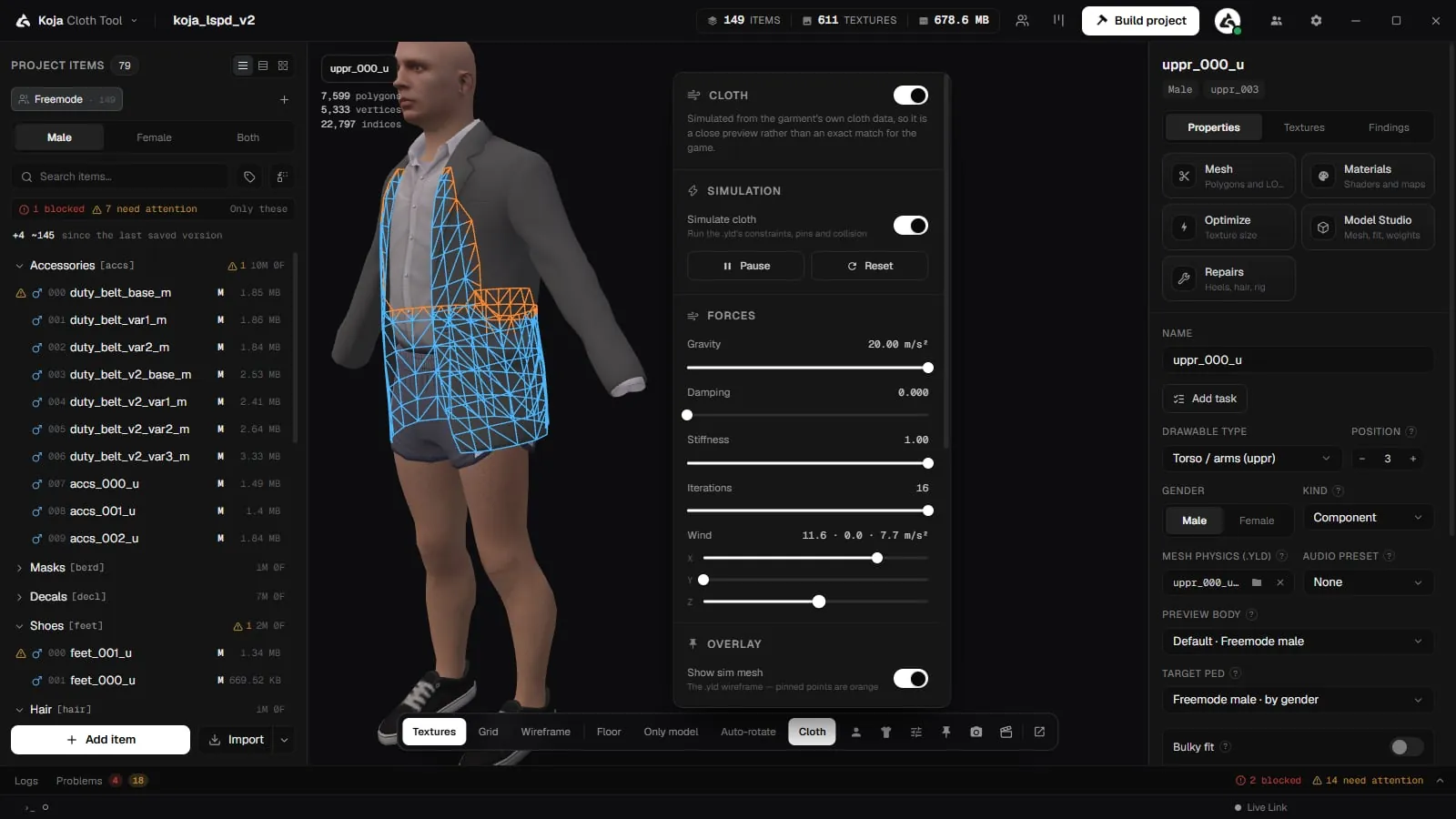
The simulation hangs off the skeleton, so it only moves once an animation is playing. With the ped standing still there is nothing to swing. Turn on Enable animation, pick a walk, and watch the hem.
Pause, Resume and Reset are there for catching a single frame.
Reading the status line
The panel says what it is actually doing, which matters because "nothing is moving" has several different causes.
| Status | What it means |
|---|---|
| The garment is following the simulation. | Working. |
| The garment is following the simulation, apart from N vertices | The binding could not place those — see Quality below. |
| The garment is not following the simulation yet. | Switched on, but not driving. Usually no animation is playing. |
This garment has no .yld cloth data. | Nothing to simulate. Not an error. |
| The garment mesh was never matched to the cloth | Only the sim mesh moves; the garment does not follow it. |
| The cloth binding does not fit the garment on screen | The .yld belongs to a different mesh than the one loaded. |
Alongside it, the counts: sim vertices, garment vertices bound, constraints, collision capsules, and how many were dropped.
Forces
| Control | What it does |
|---|---|
| Wind | Direction and strength, per axis. |
| Gravity | How hard the cloth falls. |
| Damping | How quickly motion bleeds off. Low damping keeps a coat swinging long after the step. |
| Stiffness | How much the constraints resist being stretched. |
| Iterations | How many times the solver passes over the constraints each frame. More is stiffer and more stable, and costs more. |
These are preview controls. They change what you see, not what ships — the game reads the .yld.
Seeing what the simulation is doing
Overlay draws the machinery on top of the garment:
- Show sim mesh — the
.yldwireframe. Pinned points are orange. - Show collision — the body volumes the cloth is pushed out of, in green.
- Overlay opacity and Hide behind the garment. With the second off, the overlay draws on top so none of it is buried inside the mesh.
Weight view recolours the garment itself to answer one question at a time:
| View | What it shows |
|---|---|
| Off | The garment shaded as usual. |
| Influence | How much of each garment vertex the cloth drives — blue none, red all of it. |
| Pinned | Orange where the garment follows cloth points that are pinned and never move. |
| Quality | How far the binding misses the garment at rest — green under 1 mm, red at 10 mm. |
Collision
Cloth collides with the ped's actual body, not only the handful of capsules a .yld happened to ship with. A garment authored against a sparse collision set still behaves, because the body underneath is real.
When the simulation is off
With Simulate cloth off, a garment's cloth panels still have to go somewhere. Those vertices store simulation indices where bones normally go, so they hang from the garment's own anchor bone — stiff, but attached, and the shadow follows the same rule so it cannot tear away from the surface separately.
Simulated garments keep their own authored shading — folds, pleats, seams — rather than flattening to the coarser simulation sheet.
Attaching cloth to an item
The cloth file goes in the item's MESH PHYSICS (.yld) slot in its properties. The slot is needed before Cloth physics does anything: without it the game has nothing to simulate. Right-click the slot's browse button to clear it.
You can attach it in three ways:
- Browse for it from the slot.
- Drop a
.yldonto an open item. It goes into the cloth slot. New in 2.0.8. - Import the garment: a
.yldbeside the model imports with it, so a coat authored as simulated arrives simulated. See Importing.
YLD XML
New in 2.0.8. The cloth slot also takes YLD XML (.yld.xml) from CodeWalker or Sollumz. It is converted to a compiled .yld for you when you attach it, and imports pick up a .yld.xml beside its model too.
To go the other way, Export as CodeWalker XML… on an item (or a selection) writes the cloth as .yld.xml.
Related pages
- 3D Preview — the viewport and its options.
- Animations — the simulation needs a move playing before it moves.
- Importing
- Validation
- Logs and Problems