

Importing
Everything comes in through the Import button above the item list. The main button imports .ydd and .ytd files; the arrow beside it opens every other way in. You can also drag files or folders onto the window.
| Import menu entry | What it takes |
|---|---|
| Import — auto-detect gender | Loose .ydd / .ytd files. The gender is read from the file names. |
| Import folder (all .ydd / .ytd)… | Every model and texture in a folder |
| Import a FiveM resource → Resource folder… / Downloaded .zip… | A whole FiveM clothing resource, reviewed before anything is added |
| Import a FiveM resource → Escrowed FiveM resource (kept as-is)… | An escrowed resource you bought, kept exactly as downloaded |
| New garment from a 3D model (.glb / .obj)… | A garment modelled in Blender or elsewhere (Premium) |
| Other formats | Any pack or project, a Koja package (.kct), a Durty project (.dctproj) or package (.dctpackage), a GTA V add-on pack (dlc.rpf) |
| Import as Male / Import as Female | Loose files, with the gender you choose |
| Makeup / face overlays… | Face overlays for the Makeup / Overlays section |
Loose .ydd / .ytd files
Select an item and click Import, or right-click an item and import onto it. The model fills the item and each texture becomes a variant. Files are copied into the project's assets/ folder.
- The gender is detected from the file name. Use Import as Male or Import as Female when the names do not say.
- Texture letters are kept when they run in order (a, b, c…). Gaps are re-lettered, and the import tells you which.
- A cloth file next to a model is picked up with it, whether it is a compiled
.yldor a CodeWalker / Sollumz.yld.xml. YLD XML is converted to.yldfor you. See Cloth simulation. - Loose
.pngand.ddstextures are accepted and converted to real.ytdfiles when you build. See Items and Textures.
Import a FiveM resource
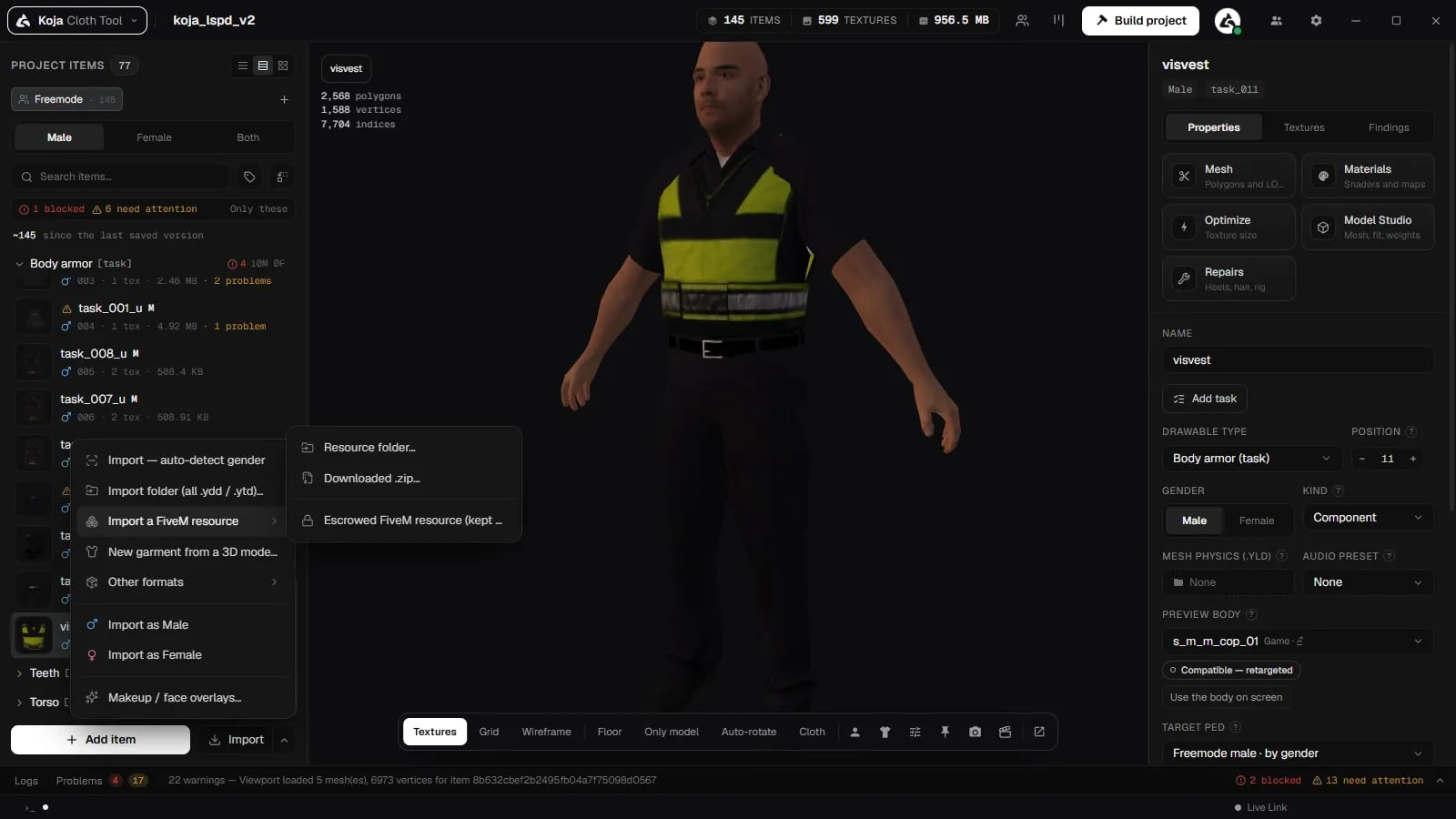
Use Import → Import a FiveM resource to add it to the open project, or Import a FiveM resource (folder / .zip)… on Home to make a new project from it.
-
Pick the resource
Choose a resource folder, a[category]folder holding several resources, or the.zipyou downloaded (or itsfxmanifest.lua). The tool reads the manifests, the variation files (.ymt) and the stream file names. -
Review it
The review lists every resource, collection and garment: item name, slot, gender, drawable number and textures. The header sums it up — resources, collections, garments and textures. -
Untick what you do not want
Everything starts ticked. Untick a whole resource, a collection, a slot or single garments. -
Import
Click Import. Nothing is copied before this point.
What the review tells you:
| Mark | Meaning |
|---|---|
| Add-on / Replaces … | Whether the resource adds new clothing or replaces a Rockstar DLC collection |
| N renumbered | Drawable numbers that had to move to fit the project |
| not in .ymt | Texture files the variation file does not register |
| name guessed | A loose file whose slot or number was worked out from its name |
| Bulky, Heels, Cloth, Alt hair, Hides hair | Settings read from the .ymt that the garment keeps |
| name already used | An item with that name is already in the project |
Under Item names choose Original file names or Short names (jbib_000).
What is kept
- Each garment keeps its bulky, high-heel, audio, cloth, hair alternate and hair-hiding settings.
- A hair alternate (the cut-down hair masks switch to) attaches to its hairstyle instead of importing as a second hair.
- Packs in ped folders (
mp_m_freemode_01,mp_f_freemode_01) take the gender from the folder. - Several collections import into one project, and each garment remembers where it came from.
- Escrowed resources found in the pick are listed separately and kept as-is. See Escrowed resources.
Replace resources
A resource that replaces a Rockstar collection is recognised. Imported from Home as a new project, it keeps building as a replace of that collection — Keep building it as a replace of … — so the drawable ids your server stored for those garments do not move.
New garment from a 3D model
Import → New garment from a 3D model (.glb / .obj)… turns a .glb, .gltf or .obj modelled on the freemode ped into a rigged item.
-
The model
Choose the file. It is shown on the ped straight away. If it stands beside the ped, lies on its back or is giant, change the axis (Y-up file, Blender's export default) or the units (Metres / Centimetres). -
The item
Give it a Name, a Slot and the gender. -
Rig it
Auto-rig the garment weights it from the ped's skin where it lies on the body, and from the garment itself where it hangs away. Adjust Trust the skin within, Fade out over, Smoothness and Mirror left and right, then Rig again if needed. Click Create the item.
The model's base-colour texture becomes texture variant A. A model without one is created without a texture; add it in Textures. Fine-tune the weights later in the Model Studio.
Durty Cloth Tool projects (.dctproj)
Already have projects in Durty Cloth Tool? Import them directly and keep working — no rebuild from scratch.
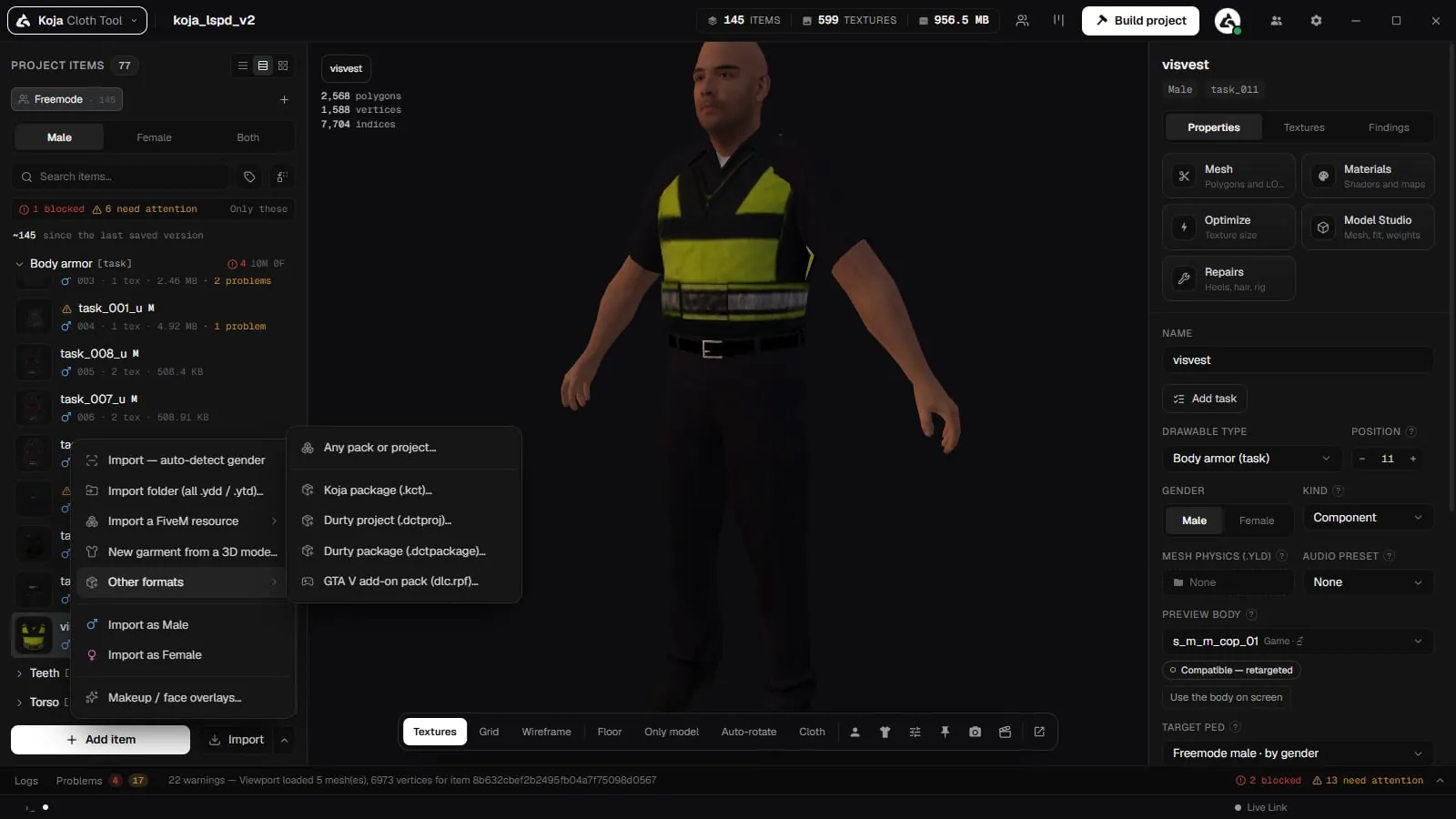
How to import:
- Choose Import → Other formats → Durty project (.dctproj)… (or the Durty import on Home).
- Point it at the Durty project — either the
.dctprojmanifest or the project folder. - The tool reads the manifest, maps every clothing item to the right slot, gender and drawable number, and copies the referenced models and textures into your KOJA project.
What comes across:
- All clothing items with their slot, gender, drawable number and name.
- Every model and texture variant, de‑duplicated by content — so a big EUP pack often shrinks dramatically on import (duplicate files are stored once).
- Component vs. prop typing is preserved.
GTA V add-on packs (dlc.rpf)
Import → Other formats → GTA V add-on pack (dlc.rpf)…, or drop the .rpf on the window. The archive becomes loose garments, shown in the import preview with every drawable number and name clash before they are added.
Sharing items between projects (.kct)
To move a handful of items between Cloth Tool projects — or share them with a teammate — export them as a .kct package rather than importing a whole project. See Sharing Packages (.kct).
Windows right-click menu
Turn on Explorer context menu in Settings → General to add these to the right-click menu of .ydd and .ytd files in Windows Explorer (on Windows 11 they sit under Show more options). Nothing else about those file types changes; they keep opening in whatever program you already use.
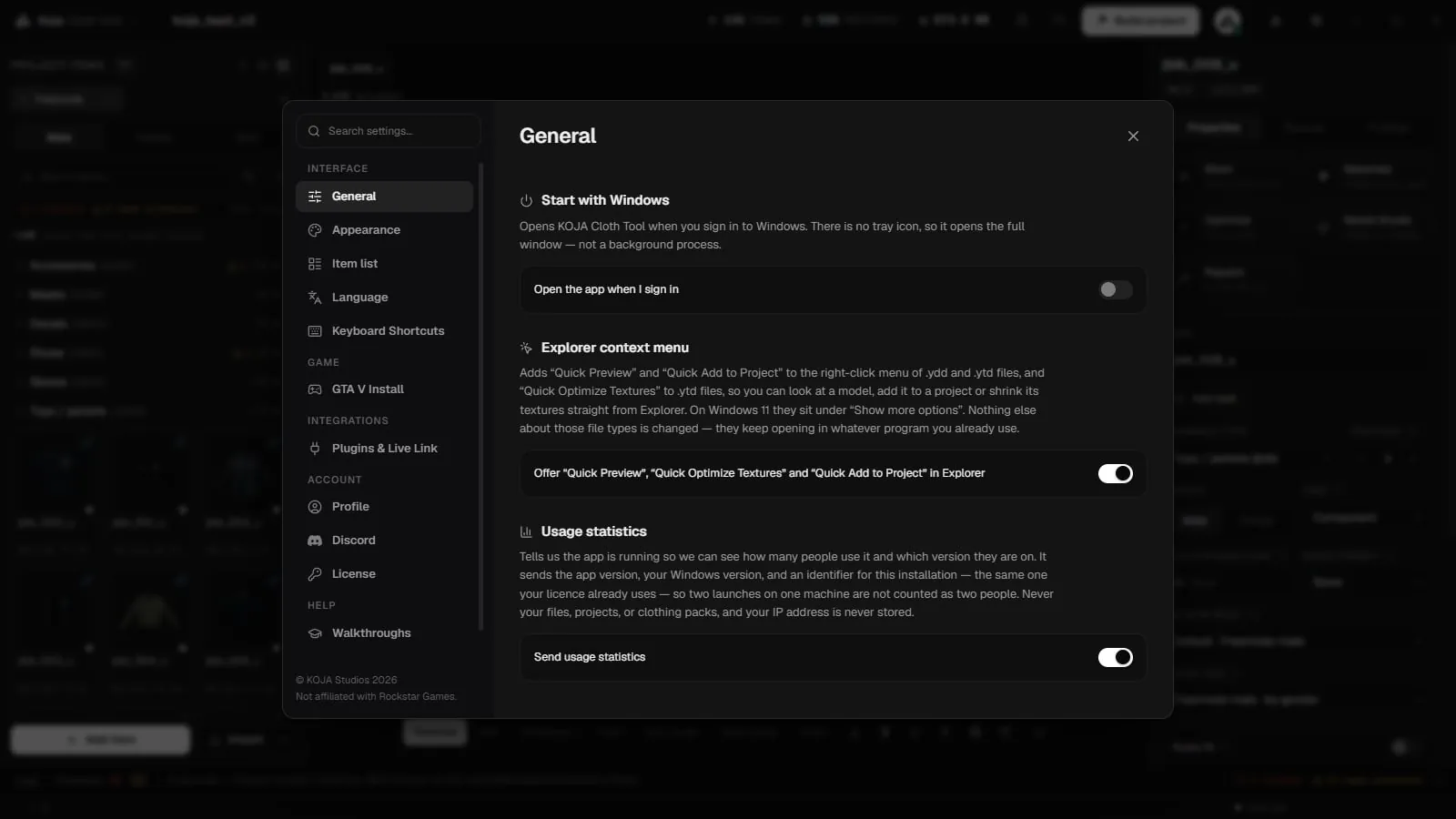
- Quick Preview — look at a model or texture without opening a project. Opens the Inspect window.
- Quick Add to Project — add the file to the project open in the tool. The tool must be running with a project open; if not, a message says what to do.
- Quick Optimize Textures (
.ytd, Premium) — see Texture Optimization.
Portability
Every import copies assets into the project and stores paths relative to the project folder. That means you can move or rename the whole project folder freely — the tool re‑resolves everything (and auto‑heals older projects that still held absolute paths) on open.
Related pages
- Escrowed resources — keep bought, escrowed resources in a project
- Items and Textures — what an item is and how texture variants work
- Model Studio — edit and rig garments made from 3D models
- Cloth simulation —
.yldand YLD XML cloth - Inspect window — look inside a
.yddor.ytd - Building — When your project is ready, hit Build and choose the FiveM target.
- About the Tool — back to the section overview