

Overview
Cloth Tool is a standalone Windows app for building GTA V clothing packs for FiveM and singleplayer. Import your .ydd / .ytd files or a whole FiveM resource, preview them on a real freemode ped, fix what the checks find, and build a ready‑to‑drop resource — for GTA V Legacy, GTA V Enhanced, or both — all from one window.
What it does
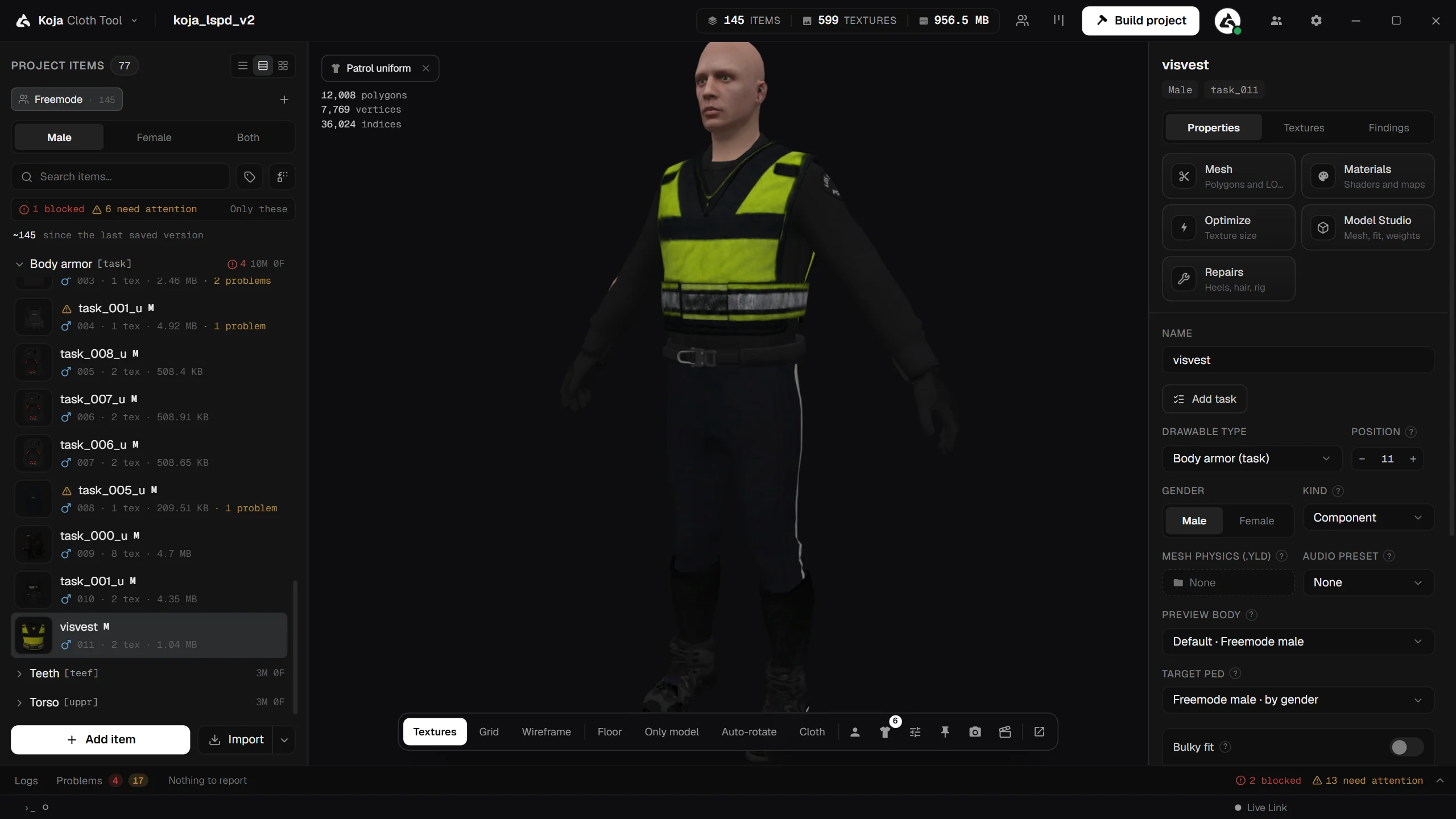
- Live 3D preview — see your garment on an actual
mp_m/mp_ffreemode ped, with your own textures, in GTA's light at any hour, walking, running and jumping. See 3D Preview. - One‑click building — a clean FiveM
streamresource with correct GTA naming and a generatedfxmanifest.lua, a singleplayerdlc.rpf, or both. Packs too big for one collection are split for you. See Building. - GTA V Enhanced — build for Legacy, Enhanced, or Legacy + Enhanced, without Cfx.re's Alchemist. See GTA V Enhanced.
- Problems panel — checks catch broken naming, missing textures, limit overflows and rig problems before they reach your server, most with a one‑click fix. See Validation and Logs and Problems.
- Import anything — loose files, folders, whole FiveM resources (
.zipor folder), Durty Cloth Tool projects anddlc.rpfpacks. See Importing. - Live Link (Premium) — edit textures in Photoshop, GIMP or Substance 3D Painter and meshes in Blender, and watch the change on the ped. See Live Link.
- Creative tools — Model Studio, Texture Creator, Tattoo Creator, Ped Creator, Photo Studio, Scene Creator and more for Premium users.
Free and Premium
The download is free. Every project can be opened and previewed, and the free plan includes 8 builds in total. Premium is one licence that unlocks unlimited builds and every paid tool.
Free
- 3D preview, Look (wet, muddy, worn, shiny, dyed), skin tones and hair colours, body presets, the Appearance menu's Ped and Look tabs
- Built-in move presets (idle, walk, run, jump) and the cloth physics preview
- Building for FiveM and
dlc.rpf, add-on or replace, Legacy and Enhanced, automatic split — 8 builds in total - The Problems panel, Findings, ignored findings and one-click fixes, and the Logs panel
- Importing FiveM resources; escrowed resources kept in a project
- Installing the Live Link plugins from the plugin manager
- Check a FiveM server, Find duplicates, Mass edit
- YLD XML cloth, GLB and CodeWalker XML export,
.kctpackages - The Inspect window, item list layouts, 18 interface languages and the themes
Premium
- Unlimited builds
- Model Studio (edit, sculpt and fit, weight paint, vertex colours, auto-rig, Repairs, Cloth Rigging Tool, Fit to ped) and New garment from a 3D model
- Material Editor and the normal and spec map generator
- Texture Creator (with the Recolour layer and colourways) and Texture Optimization
- Ped Library, preview on library peds, Target ped, outfits and ped clothing builds
- Ped Creator
- Shop metadata and shop export
- Photo Studio, Scene Creator, Mesh Optimizer, Tattoo Creator, Animation Creator and your own animation clips
- Team collaboration (parties and version history) and Friends
- Live Link: "Edit in", live updates from Photoshop, GIMP, Substance 3D Painter and Blender, and the Blender add-on's commits
How this documentation is organised
Start Here
Install the tool and build your first pack.
About the Tool
Every window, tool and option, one page each.
Information and Errors
FAQ, common errors, GTA's limits and naming rules.
Related pages
- Start Here — Welcome!
- About the Tool — every tool in the Cloth Tool, one page each
- Information and Errors — FAQ, Common Errors, Limits and Naming for Information and Errors.
- Cloth Tool — back to the section overview