

Tattoo Creator
Clothing packs often ship with matching ink. The Tattoo Creator lets you import tattoo art, place it on the freemode ped and build it as a real GTA V tattoo (a ped decoration overlay) — without leaving the tool.
Opening it
Open a project, then open the app menu (click Koja Cloth Tool at the top left) and choose Tattoos…. The Tattoo Creator opens in its own window, with the tattoo library on the left, the ped in the middle and the inspector on the right.
Adding tattoos
Click Import images… in the library and pick one or more pictures (.png, .jpg, .jpeg, .dds or .ytd). Each becomes a tattoo in the library.
The library can be searched and filtered by zone and by gender. Each row can be hidden in the viewport, and tattoos not included in the build are marked Off. Swap artwork… replaces the art of many tattoos at once, matched by file name; you review every match before anything is replaced.
Placing a tattoo
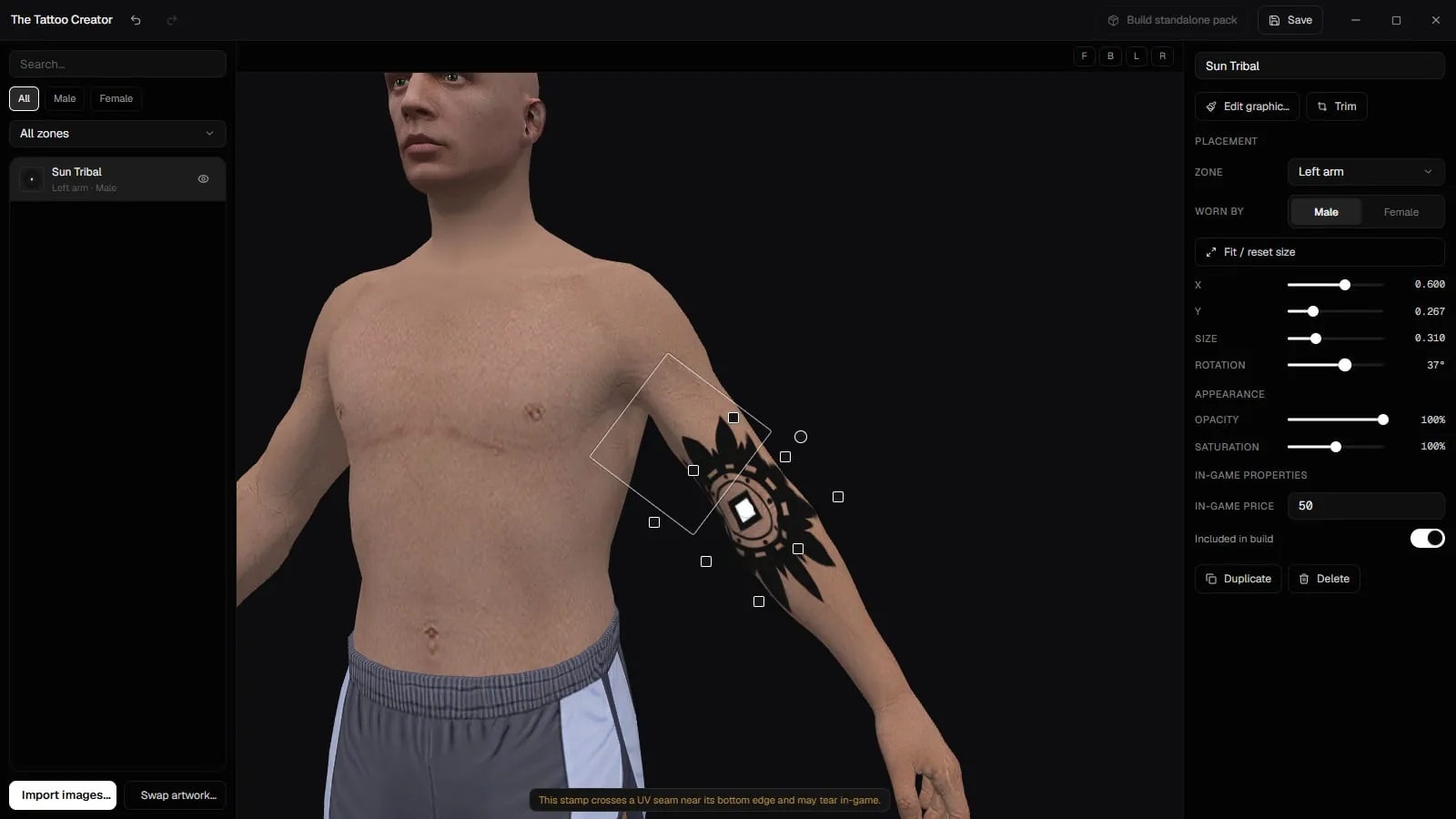
Select a tattoo and place it on the ped:
- On the ped: drag the gizmo — the centre moves it, the ring rotates it, and the edges and corners resize it.
- In the inspector: under Placement, set the Zone (torso, head, left or right arm, left or right leg), who it is Worn by, and type or drag X, Y, Size and Rotation. Fit / reset size puts the size back to fit.
When you move a tattoo to another zone, the camera glides round to face it where it now sits. What you see is what you get in game: the placement values are written straight into the tattoo files.
The window warns you when a stamp crosses a UV seam (it may tear in game), runs past the edge of the skin sheet, or reaches from the back onto the arm and under the armpit.
Appearance and in-game properties
- Appearance: Opacity and Saturation. GTA V has no runtime opacity or colour for tattoos, so these are baked into the exported texture, and the preview matches the game.
- Edit graphic…, Trim and Replace image… change the art itself.
- In-game properties: In-game price, and Included in build, which decides whether the tattoo is part of the project's builds.
Duplicate and Delete are at the bottom of the inspector.
Saving and shortcuts
Click Save (or Ctrl+S) to write the tattoos into the project. If the window closes with unsaved edits, the next time it opens it offers to Recover them.
Press ? for the full list of keyboard shortcuts. The main ones:
| Keys | Action |
|---|---|
| Ctrl+Z / Ctrl+Shift+Z or Ctrl+Y | Undo / redo |
| Ctrl+D | Duplicate the selected tattoo |
| Delete or Backspace | Delete the selected tattoo |
| Arrow keys | Nudge the selected tattoo (hold Shift for a finer step) |
| Ctrl+S | Save |
Building tattoos
With your clothing pack
When you build a FiveM pack, the build window's Tattoos section lists every tattoo with the ones Included in build ticked. Unticking one there affects only that build; the tattoo's own Included in build setting is what changes the project's default. Tattoos in a clothing build are converted for GTA V Enhanced along with the rest of the pack when you build for Enhanced.
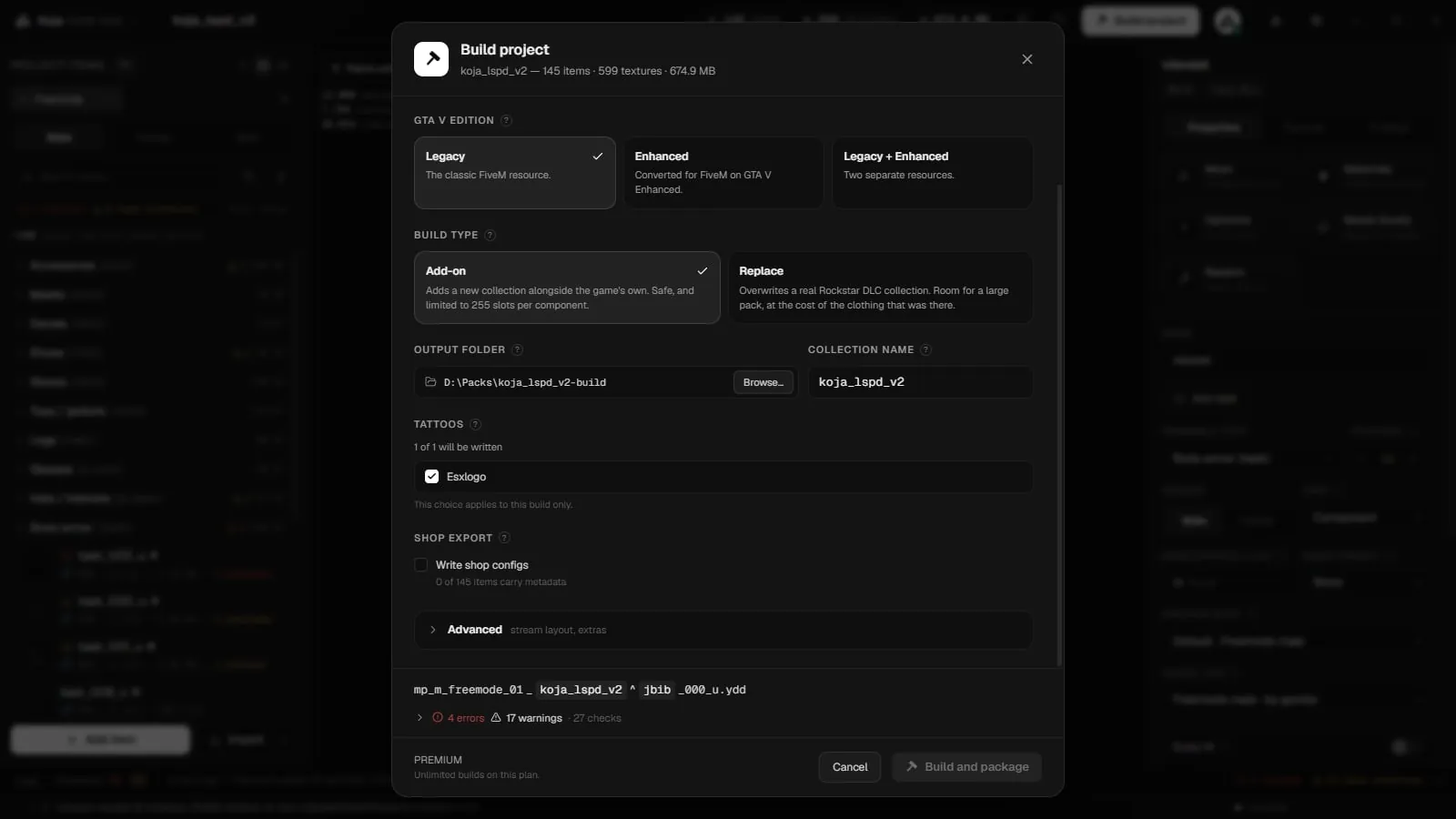
As a standalone resource
Build standalone pack in the Tattoo Creator builds tattoos as their own FiveM resource, with no clothing pack needed. Save your edits first: the pack is built from the saved project.
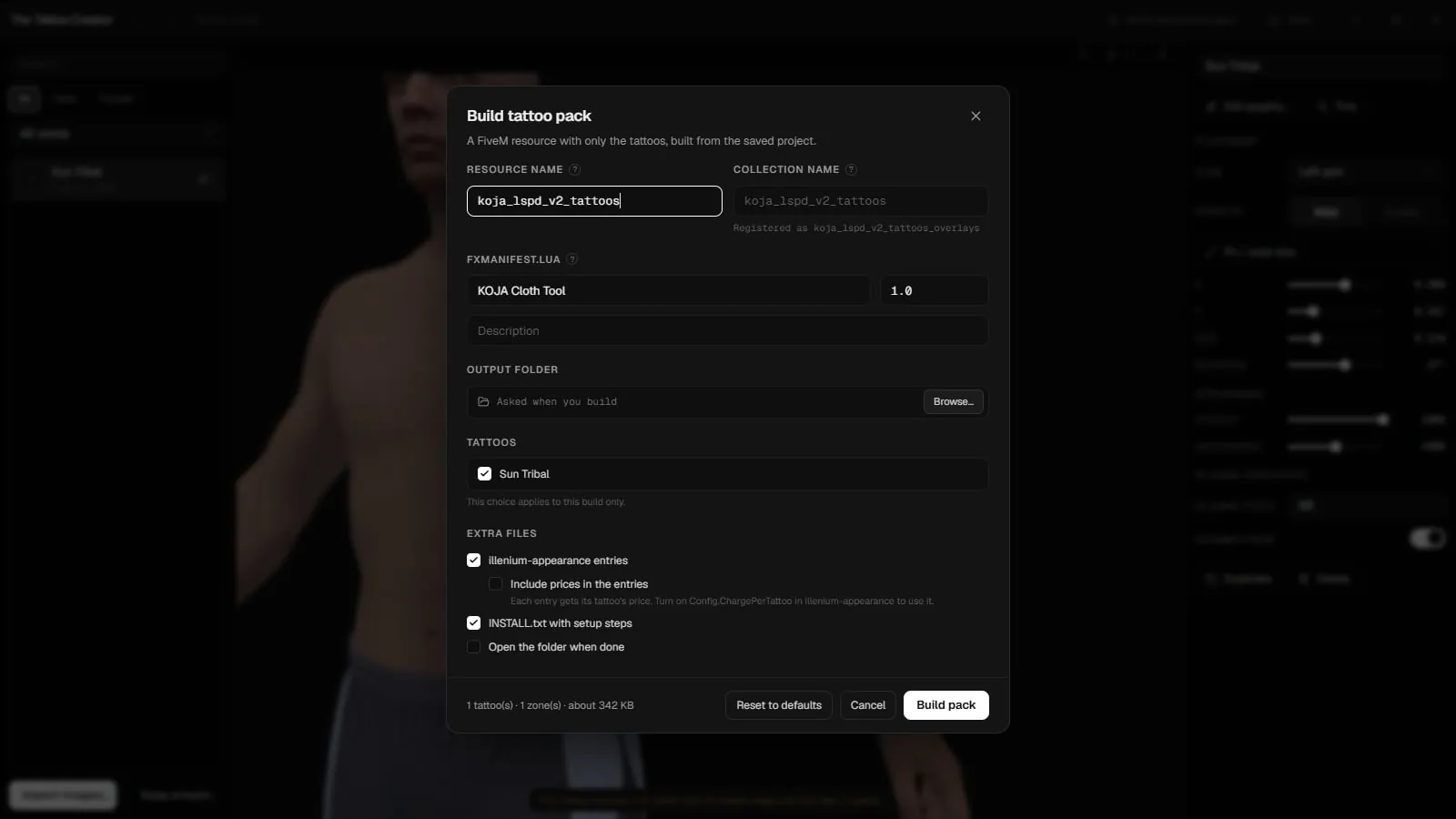
New in 2.0.8, it opens the Build tattoo pack window, where you choose how the resource is made:
| Setting | What it does |
|---|---|
| Resource name | The folder name, and what server.cfg starts with ensure. Lowercase letters, digits, _ and - only, up to 64 characters, so the name is safe for FiveM. |
| Collection name | The name the tattoos are registered under in the game files and in tattoo menus. The window shows what it becomes, for example Registered as mypack_overlays. Leave it empty to use the resource name. |
| fxmanifest.lua: Author, Version, Description | Written into the resource's fxmanifest.lua. Empty fields use the project's own details. |
| Output folder | Where the resource goes. Left empty, you are asked when you build. |
| Tattoos | Which tattoos go in. This choice applies to this build only; the tattoo's Included in build setting is the default. |
| Extra files | illenium-appearance entries, Include prices in the entries, INSTALL.txt with setup steps, and Open the folder when done. |
A summary at the bottom counts the tattoos and zones and estimates the size. Reset to defaults puts every setting back, and Build pack builds it.
Your choices are saved in the project, so the next build, or a teammate's, starts from them. A standalone tattoo resource is GTA V Legacy only; for Enhanced, include the tattoos in a clothing build with the Enhanced target.
What a tattoo build writes
- one
.ytdper tattoo in the stream folder, with soft edges kept, <collection>_overlays.xmlandshop_tattoo.meta, in the game's own format,illenium-appearance_tattoos.lua— ready-to-paste entries for illenium-appearance'sshared/tattoos.lua, grouped by zone,INSTALL.txtwith the install steps,fxmanifest.luawith the author, version and description you chose.
In a standalone pack, illenium-appearance_tattoos.lua and INSTALL.txt can be left out under Extra files.
Every illenium-appearance entry can also carry the tattoo's In-game price as cost: in a clothing build when shop export is on, and in a standalone pack with Include prices in the entries. Set Config.ChargePerTattoo = true in illenium-appearance's config to use it.