

Team collaboration
Everyone works on the same pack, and every change is kept as a version anybody can go back to. There is nothing to set up by hand: no GitHub account, no repository to create, no token to generate, no folders emailed around.
A shared pack is called a party. Open everything on this page with Team in the top bar.
Before you start
- Sign in with Discord. Parties run from your Discord sign-in; it is the only account you need.
- Save the project to a folder. Versions are kept alongside the pack, so a project that has never been saved to a folder cannot have them.
- Git. Passing the pack between machines uses a small free program called Git. If your PC does not have it, the Team window says so and offers Set up Git. Nothing in your party is lost while you do.
Starting a party
-
Start it
Click Start a party. You own it. There is nothing to name and no account to connect. -
Publish the pack
Publish this pack sends everything you have saved, so every version is kept somewhere safe and anybody you invite can open it. -
Invite people
See the next section.
Inviting people
Two ways, and they behave differently:
- Discord ID: puts the invite straight into that person's app. They see it waiting when they open the Team window.
- Invite code: one-time, and it expires in a week. Send it however you like, and Revoke it if you change your mind.
Joining works immediately. There is no waiting for the host to approve anything and no need for the host to have the app open.
The party window
Four tabs: Changes, Versions, People and Storage.
Changes
Everything that is different from your last saved version, grouped by garment, with each file's size before and after. An optimised texture reads as 8.0 MB → 2.1 MB. Files are marked A (added), M (modified) or D (deleted). Changes to the project file itself are listed as "the pack's own settings".
Type a short note that names the version and click Save a version. Nothing leaves this machine until you Sync.
The tab also lists New from the others (versions other people saved that are not in your copy yet) and your Recent versions.
Versions
Sync brings in everyone else's versions and sends yours, and tells you what it did, for example "Brought in 3, sent 1".
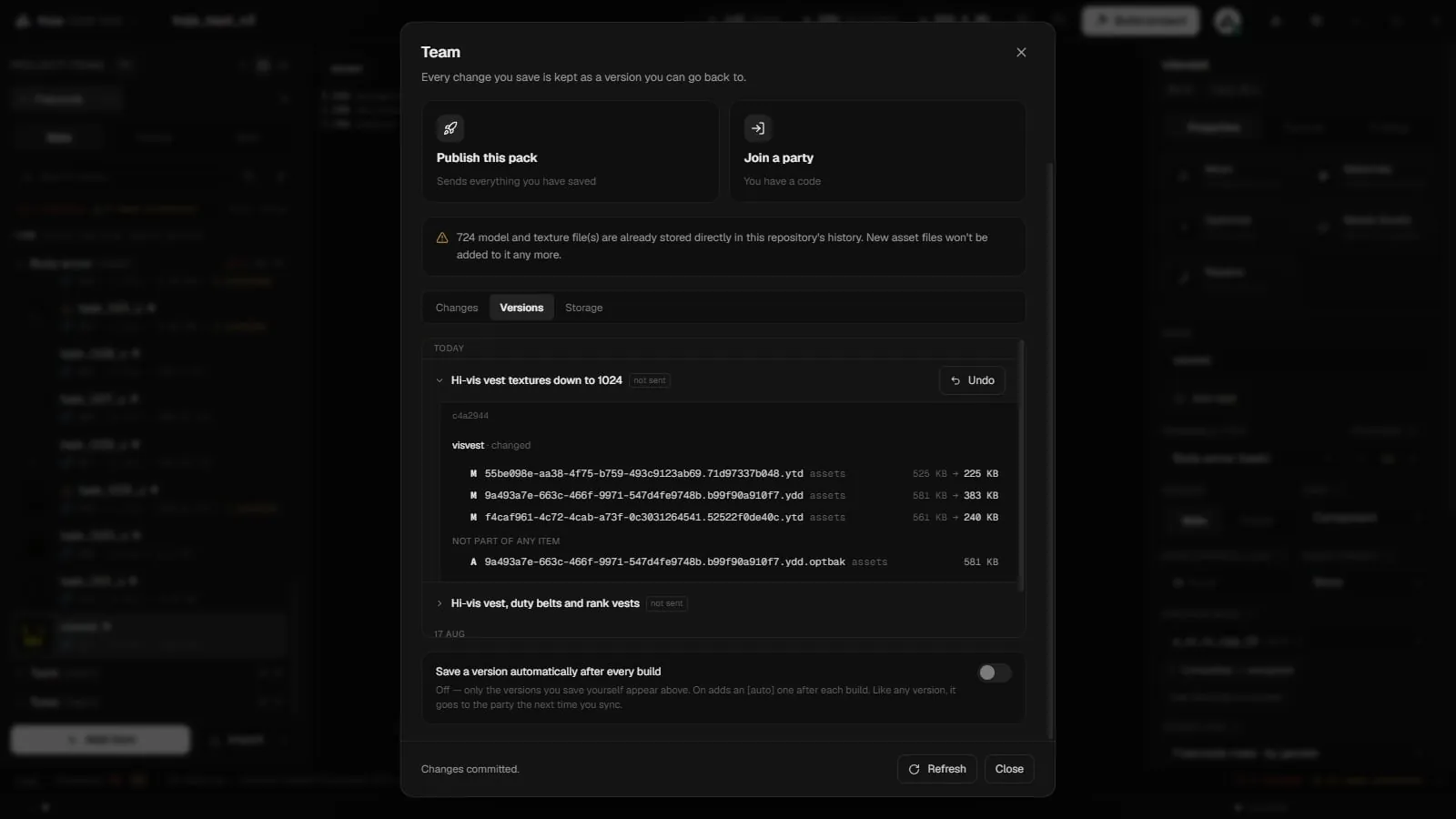
A version row opens up to say what changed: which garments were added, removed, renamed or changed, and how the pack's size moved. Renaming an item keeps it the same item rather than reading as a deletion.
| Action | What it does |
|---|---|
| Look | Opens a garment as it was in that version, in its own window, so you can see it before you decide anything. |
| Restore just this | Puts that one garment back, with its model and textures. Everything else stays where it is. |
| Restore | Takes the whole pack back to that version. Anything you have not saved yet is kept as a version of its own first. When the version's files are not on this machine, the button reads Download and restore. |
| Undo last version | Takes the pack back to before the newest version. Nothing is deleted: the version stays in the list and the undo is itself a new version you can undo. |
A restore checks it can finish before touching anything.
Save a version automatically after every build adds an auto version after each build. It is off by default.
People
Everyone who has joined the party. A filled dot means they are in the app right now; a hollow one means they were.
Leave the party: your copy of the pack stays on this machine.
Storage
What this machine holds, what the pack and its history weigh, how much of the party's storage allowance is used, and what has not left this machine yet.
| Control | What it does |
|---|---|
| Download all | Pulls the rest of the pack down. When all of it is here, you can work and build offline. |
| Download the rest of the pack in the background | Fills in assets you have not opened yet. Turn it off on a metered connection; anything you open still downloads. |
| Clean up | Clears unused files from the project folder. It never touches the built pack or the version history. |
| Check what can be freed | For the host: finds files in party storage that no version of the pack has ever used, says how much that is, and only then offers to free them. Every version stays restorable. |
If party storage fills up, deleting old parties frees their space.
Working while it downloads
Join a party and the pack opens straight away. Each garment's files arrive when you click it, with the next few fetched ahead of you, and the rest fills in quietly in the background.
An upload interrupted by a crash or a dead connection resumes where it stopped. Nothing is published until every file is stored, so a teammate never pulls a half-uploaded pack.
Notifications
Under Notifications, the host can point the party at a Discord channel. It then announces the pack's activity: who saved what, and when. Only the host can set or change it.
Just you
Keep a private history gives you versions on this machine only, with no party and no upload. You get the same Changes and Versions tabs, so you can always go back. It still needs Premium.
A local-only history exists in one place. If the machine goes, so does the history.
Under Storage, local history can be trimmed: freeing up removes local copies of versions older than 30 days. The current pack and anything from the last month always stay.
Parties made before KOJA storage
Parties created before KOJA hosted them were kept on GitHub. They can no longer sync. Start a new party to keep working together; new parties keep their files in KOJA storage.